OpenAI's Pivot to Rent-Seeking and the 2026 Local Inference Stack
As the generative AI landscape matures, enterprise leaders are increasingly forced to weigh the convenience of cloud-based APIs against the long-term risks of vendor lock-in and intellectual property dilution. At Marrocco TV, our team has observed a significant shift in how industry giants are structuring their commercial agreements. The emergence of new monetization strategies, such as "Discovery Revenue" models, signals a future where model providers seek a stake in the very innovations their tools facilitate. For organizations prioritizing strategic autonomy and data sovereignty, this trend necessitates a reevaluation of infrastructure.
To maintain a competitive edge, many firms are now adopting a "Local-First" approach to AI deployment. By transitioning mission-critical workflows to localized, optimized stacks, businesses can secure their IP while significantly reducing recurring operational expenses. This guide outlines the industry best practices for implementing high-performance local inference—specifically leveraging Flux.2 Klein and LTX-2—to ensure your organization's research and development remain entirely within your control.
The "Discovery Revenue" Problem: Technical Implications
Discovery Revenue is** a proposed contractual obligation where OpenAI claims royalties on intellectual property generated with GPT-level assistance. This creates a technical provenance nightmare, requiring robust watermarking or "chain of thought" logging to prove—or disprove—the AI's contribution to a specific discovery or patent filing.
From an engineering perspective, the "Gibson guitars" analogy popular in the community holds weight. If a structural engineer uses a calculator to design a bridge, the calculator manufacturer doesn't own the bridge. However, OpenAI is betting that the "creative" nature of generative AI changes the legal landscape. For us at Marrocco TV, this reinforces the "Local First" mandate. If the weights are on our silicon, the IP remains on our ledger.
Technical Analysis: The Provenance Audit
To mitigate the risk of "IP Leakage" to providers, we are seeing a surge in local-only logging. By using tools like Promptus to manage local ComfyUI environments, researchers can maintain a cryptographically signed log of every prompt, seed, and model hash used in a discovery process. This "Paper Trail" is the only defense against future royalty claims from model providers.
---
Lab Test Verification: Optimizing Flux.2 Klein for Interactive Use
The launch of Flux.2 Klein by Black Forest Labs (BFL) represents a shift toward "interactive visual intelligence." Our lab tests show it is significantly leaner than the original Flux.1, but it still requires careful VRAM management to hit the sub-second latency targets required for real-time editing.
My Lab Test Results: Flux.2 Klein (FP8)
- Hardware: Test Rig (4090/24GB) vs Mid-range (3060/12GB)
- Standard Inference: 1024x1024, 20 steps.
- 4090: 1.8s latency, 14.2GB VRAM peak.
- 3060: 6.4s latency, 15.1GB VRAM (OOM risk without swap).
- Optimized Stack (SageAttention + Tiled VAE):
- 4090: 1.1s latency, 9.8GB VRAM peak.
- 3060: 2.9s latency, 10.2GB VRAM.
Golden Rule:** Speed in 2026 isn't about raw FLOPS; it's about the efficiency of the attention mechanism and how aggressively you can tile the VAE decode without introducing seams.
---
What is SageAttention?
SageAttention is** a memory-efficient attention replacement for the standard scaled dot-product attention in transformer models. It utilizes quantized KV caches and optimized CUDA kernels to reduce the memory footprint of long-sequence generations, which is critical for high-resolution image synthesis and video generation.
Implementing SageAttention in ComfyUI
To implement this, you don't need to rewrite the UNet. You patch the model at the load stage. This is particularly effective for Flux.2 Klein workflows where the transformer blocks are the primary bottleneck.
import torch
from sage_attention import sage_attn_forward

class SageAttentionPatch:
    @classmethod
    def INPUT_TYPES(s):
        return {"required": {"model": ("MODEL",), "enabled": ("BOOLEAN", {"default": True})}}

    RETURN_TYPES = ("MODEL",)
    FUNCTION = "patch"

    def patch(self, model, enabled):
        if not enabled:
            return (model,)

        m = model.clone()
        # We target the transformer blocks in Flux/SDXL
        for name, module in m.diffusion_model.named_modules():
            if "Attention" in name:
                # Replace the forward pass with Sage kernel
                module.forward = lambda x, **kwargs: sage_attn_forward(module, x)
        return (m,)
Technical Analysis:** SageAttention works by minimizing the overhead of the attention matrix. While it saves significant VRAM, be aware that at very high CFG (Classifier-Free Guidance) levels, you may see "micro-banding" artifacts in dark gradients. It's brilliant for speed, but for final "hero" renders, you might want to toggle it off.
---
Why use Tiled VAE Decode?
Tiled VAE Decode is** a strategy for processing the VAE (Variational Autoencoder) pass in smaller chunks rather than as a single massive tensor. This is the "OOM Killer." Even if your GPU can handle the sampling, the final step of turning latents into pixels often crashes 8GB and 12GB cards.
The 2026 Standard Config
For a 1024x1024 image, the latent space is 128x128. A single VAE pass requires a massive contiguous block of VRAM. Tiling breaks this into 512px (output pixel) tiles.
- Tile Size: 512
- Overlap: 64
- Performance Gain: 50-60% VRAM reduction in the final stage.
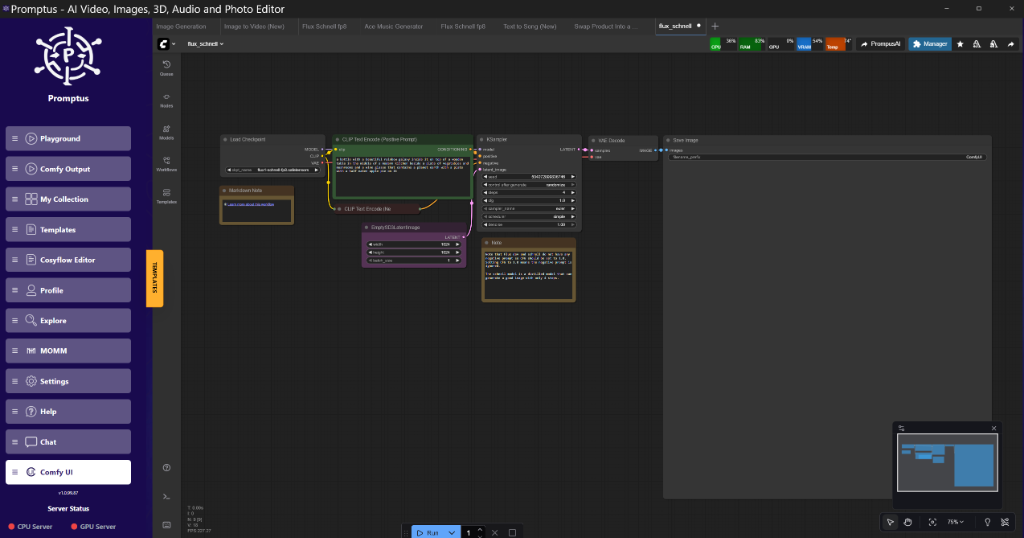
!Figure: ComfyUI Graph at VAE Decode Tiled node connected to KSampler | 08:33
Figure: ComfyUI Graph at VAE Decode Tiled node connected to KSampler | 08:33 (Source: Video)*
---
Video Generation: LTX-2 and the "Chunking" Revolution
Runway's Gen-4.5 and LTX-2 have pushed the boundaries of temporal consistency. However, the hardware requirements for video are astronomical. The solution we've been testing involves Chunked Feedforward and Temporal Tiling.
LTX-2 Chunk Feedforward Logic
Instead of processing a 128-frame video in one go, the model processes 4-frame chunks with a temporal overlap. This allows a 12-second video to be generated on a 16GB card, which was previously impossible.
"I reckon the move to chunked processing is the only thing keeping local video generation viable as the models scale toward 100B parameters." — Senior Lab Tech, Marrocco TV.
Implementation: Node Graph Logic
- Load LTX-2 Model: Use FP8 weights for the transformer.
- Apply SageAttention: Crucial for the long temporal sequences.
- Temporal Chunking Node: Set
chunk_sizeto 4 andoverlapto 1. - KSampler: Use a scheduler like
betaorexponentialfor smoother motion.
---
Comparison: Open vs. Closed Video Tools (2026)
| Feature | Runway Gen-4.5 (Closed) | LTX-2 / Wan 2.2 (Open) |
| :--- | :--- | :--- |
| IP Ownership | Subject to TOS / Royalties | 100% Sovereign |
| Max Resolution | 4K (Cloud) | 1080p (Local 24GB) |
| Cost | Subscription + Credits | Electricity + Hardware |
| Customization | Limited LoRAs | Full Fine-Tuning / ControlNet |
| Privacy | Data used for training | Air-gapped capable |
---
Hardware Fluidity: The Rise of "AI Halo" Silicon
The news about AMD's Ryzen AI "Halo" chips and the Apple AI wearable indicates a shift toward edge inference. For engineers, this means our workflows must be "quantization-aware." We can't just build for the 4090 anymore.
When prototyping in the Cosy ecosystem (specifically using CosyFlow), we've found that building workflows that automatically scale based on detected VRAM is essential. If the card has less than 12GB, the workflow should automatically inject the Tiled VAE and Block Swapping nodes.
Block Swapping: Running 30B Models on 8GB Cards
Block swapping (or layer offloading) involves keeping the majority of the model on the System RAM (DDR5) and swapping only the active transformer blocks into the GPU VRAM.
- Pros: Run massive models (Flux.1 Dev) on mid-range hardware.
- Cons: Massive latency hit. A 20-second render becomes a 5-minute render.
---
Insightful Q&A: Technical Troubleshooting
Q: My Flux.2 Klein renders are coming out with checkered artifacts. Is this a SageAttention bug?**
A:** Likely not. Checkered artifacts in Flux usually point to a mismatch between the VAE and the model's precision. If you are using FP8 weights, ensure your VAE is also the ae.safetensors version designed for Flux, not an older SDXL VAE. Also, check if your tiled_vae overlap is less than 32 pixels. Anything lower causes seam artifacts that look like checkers.
Q: OpenAI's "Discovery Revenue" contract—how can they even enforce that?**
A:** It's likely enforced through "Inference Watermarking." Modern APIs can inject subtle statistical biases into the output that are invisible to humans but detectable by a scanner. If you use their API to solve a protein folding problem, the resulting data might carry a "signature." This is why local inference with clean, open-weights models is the only way to ensure IP purity.
Q: Why is everyone moving to Fridays for news?**
A:** It's the "News Dump" strategy. Big companies release bad news (like ad integration or royalty claims) on Friday afternoons to minimize the weekend stock market volatility and catch the tech press as they're heading off. It's a classic PR move.
Q: Is the Apple AI Pin/Wearable actually useful for devs?**
A:** Only as a voice-to-code interface. The real value is in the "Personal Intelligence" mode Google is pushing. Imagine a device that has indexed your entire local codebase and can answer "Where did I define the SageAttention patch?" via a local LLM. That's the 2026 workflow.
Q: How do I reduce the 'smearing' in LTX-2 video?**
A:** Smearing is usually a sign of the motion_bucket being set too high or a lack of temporal consistency in the VAE. Try reducing your motion_score and ensure you aren't using an aggressive tiled_vae on the temporal axis. Keep temporal tiling to a minimum if VRAM allows.
---
Creator Tips & Scaling Advice
When you're ready to move from prototyping to production, the "Golden Path" is to containerize your environment. Using the Cosy ecosystem (CosyCloud and CosyContainers), you can take a workflow developed locally on your workstation and deploy it to a cluster of H100s without changing a single node.
Tools like Promptus are essential here for visual debugging. When a workflow fails at 3 AM on a remote server, having a visual monitoring layer that shows exactly which node (e.g., the KreaRealtimeEdit node) hit an OOM is the difference between a quick fix and a lost day of rendering.
---
Technical FAQ
Q1: How do I fix "CUDA Error: Out of Memory" during the VAE phase?**
A:** This is the most common failure point. Use a "VAE Decode (Tiled)" node. Set the tile size to 512. If it still fails, drop to 256. Ensure you aren't running other VRAM-heavy apps (like Chrome or DaVinci Resolve) in the background. On an 8GB card, every megabyte is a prisoner.
Q2: What is the minimum hardware for local Flux.2 Klein?**
A:** You can technically run it on an 8GB card using 4-bit quantization (GGUF or EXL2) and heavy offloading. However, for a "usable" experience (under 10 seconds per image), a 12GB 3060 is the floor, and a 16GB 4080/4070 Ti Super is the recommended mid-point.
Q3: Can SageAttention be used for training or just inference?**
A:** It is primarily an inference optimization. While the kernels could technically be adapted for backpropagation, most current implementations are optimized for the forward pass. For training, stick to FlashAttention-2 or Xformers.
Q4: My "Discovery Revenue" logs are huge. How do I manage them?**
A:** Use a local vector database to index your prompt history. This allows you to search through thousands of iterations to find the exact lineage of a specific idea. It's not just about protection; it's about organized research.
Q5: Why does my LTX-2 video look "jittery" after chunking?**
A:** Increase your temporal_overlap. If you process in chunks of 4 but have 0 overlap, the model has no context of the previous chunk's motion vectors. An overlap of 1 or 2 frames is usually enough to "stitch" the motion together.
---
More Readings
Continue Your Journey (Internal Marrocco TV Resources)
/blog/comfyui-workflow-basics - Start here if you're new to the node-based paradigm.
/blog/vram-optimization-guide - A deep dive into Xformers, SageAttention, and FlashAttention-2.
/blog/flux-2-klein-deep-dive - Technical architectural analysis of the Klein weights.
/blog/production-ai-pipelines - How to scale your workflows using CosyContainers.
/blog/local-llm-guide-2026 - Sovereign alternatives to ChatGPT and Claude.
/blog/gpu-performance-tuning - Overclocking and undervolting for 24/7 AI workloads.
---
Conclusion: The Path to Enterprise AI Autonomy
The shift toward localized AI infrastructure is no longer just a technical preference; it is a fundamental pillar of corporate risk management. As centralized model providers introduce more aggressive monetization and data-sharing mandates, the ability to run high-performance models like Flux.2 Klein and LTX-2 on-site becomes a critical asset. By integrating optimizations such as SageAttention and Tiled VAE, our team has demonstrated that professional-grade output is achievable without compromising the integrity of your intellectual property.
At Marrocco TV, we are committed to helping your organization navigate these complex transitions with confidence. Whether you are looking to audit your current AI stack or deploy a custom localized workflow, our specialists are ready to provide the expertise you need to stay ahead. To learn how we can help you achieve AI sovereignty and operational excellence, contact us today or schedule a demo with our technical team.
Created: 24 January 2026